

Use this percentage change calculator to find how much a value has changed as a percentage. Enter the original value and the new value to see whether it went up or down, and by how much. It works for prices, scores, population, sales, and more. Below the tool you’ll find the article including the formula, worked examples and when not to use percentage change.
Quick answerPercentage change formula = (New − Original) ÷ Original × 100
Example: a price goes from $40 to $50.
(50 − 40) ÷ 40 × 100 = 25% increase.
A negative result means a decrease
Table of Contents
What Is a Percentage Change?
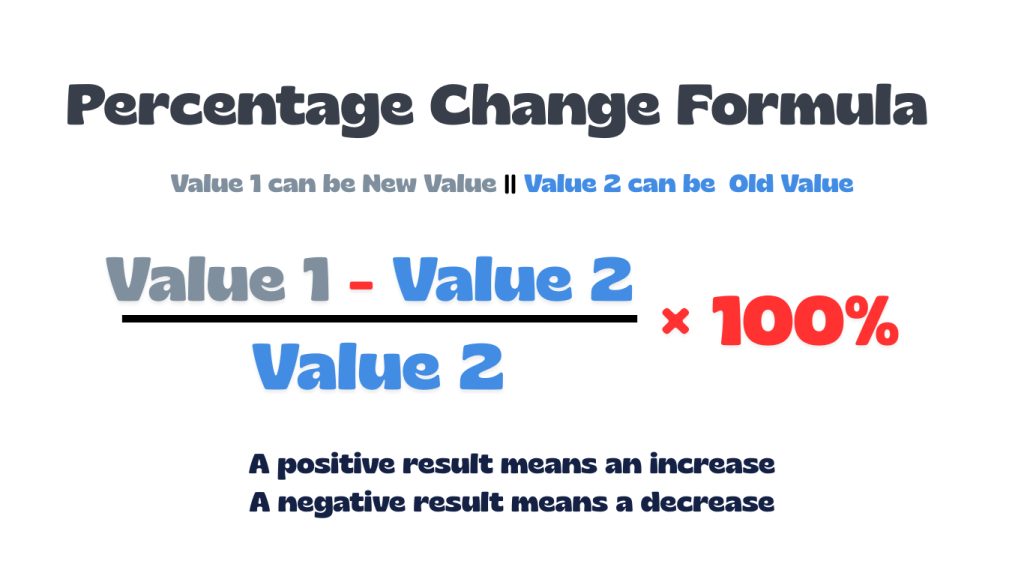
Percentage change indicates whether a value has increased or decreased compared to its original value. The calculation is done by first subtracting the original value from the new value, then dividing the result by the original value, and in the end multiplying the result by 100.
There are 2 possible results that can be outputted, a positive number, which means an increase, and a negative number, which indicates a decrease. This approach is widely used for understanding growth or loss in fields like data analysis, sales, and finance. An example can be a sales increase from 400$ to 500$ the 100$ difference shows a 25% increase.
Why Percentage Change Is Important
Percentage change is a crucial method because it shows relative increase or fall rather than just absolute numbers. It helps make it easier to compare results, spot changes over time, and make smart decisions in finance, work, and everyday situations. Percentage change makes data easier to understand and act upon by clearly displaying both the size and direction of change, going beyond raw numbers.
Because change is represented as a percentage, it becomes more easier and clearer to spot whether the difference is major or minor. For example, an increase indicates significant growth or minor change. Additionally, percentage change makes it possible to fairly compare values of various sizes, track trends over time, and promote wiser choices in areas such as budgeting, discounts, economic research, and investment
Percentage Change Formula
The percentage change formula compares the difference between two values with the original value. A positive result is an increase, and a negative result is a decrease. The image below shows the formula which also is used in our percentage change calculator, and the next section walks through it step by step.
How to Calculate Percent Change (Step-by-Step)
To calculate percentage change between two numbers, follow the simple steps below:
- First, we find the amount of change by subtracting the original value (start) from the new value.
- Then, we divide the amount of change by the original value.
- Finally, convert the decimal number to a percentage by multiplying by 100 and adding the % sign.
Keep in mind
- A positive result means an increase.
- A negative result means a decrease.
- In the second step, never divide by the new value.
Percentage Change Examples
The examples below use the same formula and steps. In each one, the result shows how big the change is compared with the original value, and a positive result means an increase while a negative result means a decrease. Enter the numbers into the percentage change calculator above to check that you get the same result.
Example 1The Rent Price Increased
Situation: Your home rent price went from $1200 to $1350. What is the percentage change?
Step-by-Step Calculation:
- Subtract the original rent from the new rent:
$1,350 − $1,200 = $150 - Divide by the original rent:
150 ÷ 1,200 = 0.125 - Multiply by 100:
0.125 × 100 = 12.5%
Result: the rent increased by 12.5%
Example 2 Finance Share Price Decreased
Situation: A share was priced at $50 and is now worth $42. What is the percentage change?
Step-by-Step Calculation:
- Subtract the original price from the new price:
42 − 50 = -8 - Divide by the original price:
−8 ÷ 50 = -0.16 - Multiply by 100:
−0.16 × 100 = -16%
Result: the share price decreased by 16%
Example 3Data & Science (Population Count)
Situation: A town’s population grows from 25,000 to 26,750.What is the percentage change?
Step-by-Step Calculation:
- Subtract the original population from the new population:
26,750 − 25,000 = 1750 - Divide by the original population:
1,750 ÷ 25,000 = 0.07 - Multiply by 100:
0.07 × 100 = 7%
Result: the population increased by 7%
Example 4Education (Test Score)
Situation: A student scored 80 on the first test and 62 on the second. What is the percentage change?
Step-by-Step Calculation:
- Subtract the original score from the new score:
62 − 80 = -18 - Divide by the original score:
−18 ÷ 80 = -0.225 - Multiply by 100:
−0.225 × 100 = -22.5%
Result: the score decreased by 22.5%
Why the Order Matters In Percentage Change
When we calculate the percentage change, the order is important because the starting value changes depending on which direction we are calculating. Every percentage change is calculated in relation to the starting value, reversing the order changes the overall percentage. From the formula, we see that the original value is in the denominator and determines how big or small the change feels.
So, when a price goes from $100 to $150 is a 50% increase, but if we reverse it back from $150 to $100 is a 33.33% decrease. Besides, the change is 50 unit for the both ways, the base is different for both of them.
How to Find the New Value After a Percentage Change
When you need to find the new value after a percentage change, which can be either an increase or decrease, you can use the formula, New value = Original × (1 + change ÷ 100). The steps and examples below will show you how to use the formula and find what you need.
Steps:
- First, we convert the percentage into a decimal number by dividing the percentage by 100.
- Then, we need to choose the multiplier for an increase we add the decimal (1 + decimal), and for a decrease, we subtract the decimal (1 – decimal).
- Finally, we multiply the original value by the multiplier in the second step, and we get the new final value.
Example 1Salary (Increase)
Situation: A monthly salary of $2,500 increases by 8%. What is the new salary?
Step-by-Step Calculation:
- Convert the percentage to a decimal
8 ÷ 100 = 0.08 - Choose the multiplier (increase: 1 + decimal)
1 + 0.08 = 1.08 - Multiply the original value by the multiplier
2,500 × 1.08 = 2,700
Result: the new salary is $2,700
Example 2Shopping (Decrease)
Situation: A laptop priced at $900 is reduced by 15%. What is the new price?
Step-by-Step Calculation:
- Convert the percentage to a decimal
15 ÷ 100 = 0.15 - Choose the multiplier (decrease: 1 − decimal)
1 − 0.15 = 0.85 - Multiply the original value by the multiplier
900 × 0.85 = 765
Result: the new price is $765
Percentage Increase vs Percentage Decrease
Percentage increase and decrease are both related and covered by percentage change using the formula given in the image above. Depending on the output from the formula, when a positive result is calculated, it means an increase, and when it is a negative result, it means a decrease. The negative result, or percentage decrease, is also usually written as a positive percentage decrease (e.g., -30% = 30% decrease).
The key difference between percentage increase and decrease is the direction of change that whether it goes up or down. To make it simpler to remember, and when percentage increase and decrease happen related to percentage change, keep in mind the note below:
Keep in MindPercentage increase: it happens when the new value is bigger than the original value, the percentage change is positive (for example, going from 10 to 15 is a 50% increase).
Percentage decrease: it happens when the new value is smaller than the original value, the percentage change is negative (for example, going from 15 to 10 is a 33.33% decrease).
Absolute Change vs Percentage Change
Absolute change is a simple difference between two values, the new value and the original value, and it tells whether the amount has increased or decreased in real units. On the other hand, percentage change indicates the size of the difference between the new and original value that is expressed as a percentage.
The same absolute change can mean very different things. For example, going from 10 to 20 and going from 100 to 110 are both change of 10, but in percentage change the first is 100% increase and the second only 10%. In cases when both values are percentages, the absolute change is measured in percentages points. For example, an interest rate rising from 4% to 5% is a 1 percentage point increase.
Percentage Change vs Percentage Difference
The percentage difference displays the differences between the two values without indicating an increase or decrease, compares them without a start or end, and utilizes the average of both as the base. On the other hand, percentage change needs and uses a starting value and an ending value so it can indicate how much a value has gone up or down over time, and also uses a base value.
You have to use percent change for situations like before and after or going from old to new, and percentage difference when comparing 2 similar values at the same time. For example, from 50 to 80 the percentage change is 30 ÷ 50 = 60%, an increase. The percentage difference between 50 and 80 is 30 ÷ 65 = 46.15%.
When Not to Use Percentage Change
Percentage change can be misleading in some situations, below we have listed some of the situations.
- When the starting value is zero, the result is undefined because you can’t divide by zero.
- In cases when the starting value is very small, for example, going from 2 to 6 is a 200% increase it sounds like a huge rise, but actually it is only 4 units change.
- The starting values are negative, results can be difficult to interpret. In these cases, you can show the absolute change too.
- If you are comparing percentages, we can use percentage points for the gap between the two rates.
- Changes can use different base values, in these cases, don’t add percentage changes together.
Common Mistakes to Avoid
When calculating percentage change, one of the most common mistakes is dividing by the incorrect number, such as using the new value instead of the original one. Other ones can be forgetting to multiply by 100, adding more percentage change incorrectly, mistaking percentage points for percentage change, and forgetting to consider whether the outcome is positive or negative. You have to keep in mind that you always divide by the original value to convert into a percentage, and to clearly indicate if it is an increase or decrease. Since division by zero is undefined, changes from zero cannot be stated as a percentage.
Percentage Change FAQs
Can a percentage change be negative?
Yes. A negative result means a decrease, because the new value is smaller than the original. A positive result means an increase.
What does a 200% increase mean?
A 100% increase doubles the value, and a 200% increase triples it, because you add twice the original amount. For example, a 200% increase on 50 gives 50 + 100 = 150.
Can a percentage decrease be more than 100%?
Not when the new value stays at or above zero, since a 100% decrease means the value has dropped to zero. It can exceed 100% when the final value goes below zero. For example, a profit falling from $100 to −$50 is a 150% decrease.
How do I calculate percentage change if the original value is zero?
You can’t. The result is undefined, because the formula divides by the original value and you can’t divide by zero. Use the absolute change (the plain difference between the two values) instead.
How do I calculate percentage change between two negative numbers?
Divide by the absolute value of the original number: (V2 − V1) ÷ |V1| × 100. Moving from −10 to −25 gives (−25 − (−10)) ÷ 10 × 100 = −150%, which is a 150% decrease. Results from negative values can be hard to interpret, so showing the absolute change as well is often clearer.
What is the difference between percentage change and percentage points?
Percentage points show the simple difference between two percentages: 10% to 15% is a 5 percentage point increase. Percentage change measures the relative change: 10% to 15% is a 50% increase, because (15 − 10) ÷ 10 = 0.5. Use percentage points when comparing rates, and percentage change for values like prices or quantities.
Why do I get a different percentage when I swap the two values?
Percentage change always uses the original value as the base, so the base changes when you swap them. Going from 100 to 150 is a 50% increase, but going from 150 back to 100 is a 33.33% decrease. If there is no clear “before” and “after”, use the percentage difference calculator instead.
How do I find the new value after a percentage change?
Multiply the original value by (1 + change ÷ 100). Increasing 200 by 15% gives 200 × 1.15 = 230, and decreasing 200 by 15% gives 200 × 0.85 = 170. See how to find the new value after a percentage change above.
How do I find the average growth over several periods?
Don’t divide the total percentage change by the number of periods, because that only gives a simple average. Use the compound rate instead: (End ÷ Start)^(1 ÷ periods) − 1. For example, 100 growing to 121 over two years is (121 ÷ 100)^(1/2) − 1 = 10% per year, not 10.5%. In a spreadsheet, use =(B2/A2)^(1/n)-1, with n as the number of periods.
How is percentage change used for profit and loss?
It compares the selling price with the purchase price: (Selling price − Purchase price) ÷ Purchase price × 100. If you buy an item for $80 and sell it for $100, that is a 25% profit. A negative result means a loss. Investors use the same calculation for share prices and other assets.
Explore More Percentage Tools
Explore more percentage calculators to help with different types of percentage problems from our site. Our tools are designed to make it easy to work out with percentage increase, decrease, change, difference, and much more tools that are only related to percentage calculations. Click any calculator below to continue solving percentage questions quickly and accurately.
Percentage Increase Calculator
Measures how much a value has gone up from its original amount, expressed as a percent.
Percentage Decrease Calculator
Measures how much a value has gone down from its starting amount as a percentage.
Percentage Difference Calculator
Calculates the percent difference between two numbers by comparing how far they are from each other.
References & Sources
To provide accuracy and precision for the calculations performed by our percentage change calculator, along with the formulas, calculation methods, real-world examples, and educational content included in this article, all information is verified and based on the following authoritative resources:
- CueMath – Percentage Change
- BBC Bitesize – Percentage Change
- Investopedia – How to Calculate a Percentage Change
- Study – Percent Change | Formula & Examples
- Maricopa Open Textbook – Absolute and Relative Change
- UEN Pressbooks – Calculate Relative Change as a Percentage