

Our Margin Calculator helps you quickly measure how profitable a product or service is by calculating the percentage of revenue that remains as profit after costs are deducted. By entering the cost and selling price, the calculator instantly shows the profit margin, making it easier to evaluate pricing strategies, control expenses, and understand overall business performance. This tool is widely used by business owners, retailers, and students to make informed financial decisions without manual calculations or errors.
Note before using the tool:
Below Margin Calculator is the TABLE of what to input and what those inputs give you, see it before using. The tool needs at least 2 inputs so it work properly.
| You input (2 values) | The calculator outputs |
|---|---|
| Cost + Revenue | Profit, Margin (%), Markup (%) |
| Cost + Profit | Revenue, Margin (%), Markup (%) |
| Cost + Margin (%) | Revenue, Profit, Markup (%) |
| Revenue + Profit | Cost, Margin (%), Markup (%) |
| Revenue + Margin (%) | Cost, Profit, Markup (%) |
| Profit + Margin (%) | Revenue, Cost, Markup (%) |
What Is Margin?
Margin is know as the difference between the products or service costs and selling price, and it is typically shown as a percentage of revenue to demonstrate profitability. Profit margin in business refers to the portion of each dollar made that is kept as profit.
Common forms of margin include gross margin, which is calculated by subtracting the cost of items sold from revenue, and operational or net margin, which takes into consideration extra costs including interest, taxes, and operating expenses.
Margin mainly is focused in productivity or efficiency instead of the total earnings, it differentiate from profit, because profit is absolute sum. In more general terms, the term “margin” can be also refer to an advantage or difference of two values, like margin of victory.
Why Profit Margin Matters
Profit margin is a crucial indicator for company financial condition and efficiency, in which it indicates how much profit is made from each dollar of sales after the costs. When it is a weak profit margin it points to possible mistakes, on the other hand when it is a strong profit margin show efficient pricing and cost control. Profit can be used in different fields depending on their needs like investors or lenders use it evaluate the stability and growth potential, company owners use it when making pricing choices, and businesses use it to compare their performance to that of their rivals and industry norms. Also, higher margins offer stability during financial crises, growth, and reinvestment flexibility.
Types of Profit Margin
Profit margins indicate how well a company generates revenue into a profit across different phrases of its business activities. By studying different kinds of profit margin, business may learn where expenses may come from, how effectively operations are running, and how much profit is actually kept. Each margin provides a better understanding of financial performance by concentrating on the level of costs.
- Gross Profit Margin: Calculates the amount of revenue that remains after subtracting the cost of goods sold (COGS). It helps in evaluating manufacturing efficiency and pricing strategies.
- Operating Profit Margin: Reflects profit before interest and taxes but after operational costs like rent, salaries, and overhead are subtracted. It shows how well a business manages its main activities.
- Net Profit Margin: Shows the proportion of final profit after all costs, such as interest and taxes, have been paid. This is the most complete measure of the entire financial well-being of a company.
- Pretax Profit Margin: Provides performance comparisons without the influence of varying tax rates by calculating profitability after all costs, with the exception of taxes.
Profit Margin vs Revenue vs Profit
Revenue indicates the entire sales a company makes before any expenses are subtracted. Profit is the real amount of money that remains after subtracting all expense that may include manufacturing, running cost, taxes, and interest. As we have explained before for the profit margin shows how well a company turns sales into profit by expressing profit as a portion of revenue. Strong sales are indicated by large revenue, but if costs are too high, this does not ensure profitability. By showing how much profit is made from every dollar of revenue, profit margin offers a deeper or better understanding of financial efficiency and general business health.
What Is Considered a Good Profit Margin?
While the industry determines what is considered a solid profit margin, broad benchmarks often serve as a guide. In general terms, a net profit margin that is around 10% is considered is considered a good and healthy one, 5% is considered as poor, and when it is 20% or more is considered as strong or good profitability.
When gross profit margin range from 50% to 70% is considered by companies as a good one, but when margins are below 30% might be dangerous if expenses are too high. Service based and software companies often earn significantly better margins due to the fact that they have more predictable expenses than manufacturing or retail ones. Businesses may review performance, pricing policies, and long-term viability with the use of these standards.
Common Misunderstandings About Profit Margin
One of the most common misunderstanding of profit margin is misinterpretation it which can lead in bad financial choices and poor pricing. A higher revenue is translated into a higher profit when increasing costs can lower margin, which is also a misconception. Profit margin and markup are determined differently and have different uses, many people, business, companies confused both of them. If operational costs are high or sales volumes is low, strong margins by themselves do not ensure success. Improved cost management, pricing tactics, and efficient operations can all increase profit margins, which are not set and knowing all the concepts that margin needs so you cant have misunderstanding.
What Is a Margin Calculator?
Our margin calculator is a financial tool that helps to determine the amount of income that is left after expenses are subtracted in order to evaluate how profitable a product or service is. The margin calculator helps you to analyze the pricing tactics, lower you expenses, and evaluate the overall financial performance by automatically displaying the results after clicking calculate. Margin is crucial for determining the health of company and setting prices, because it concentrates on profit as a proportion of selling price, as compared to markup, which is focused on costs.
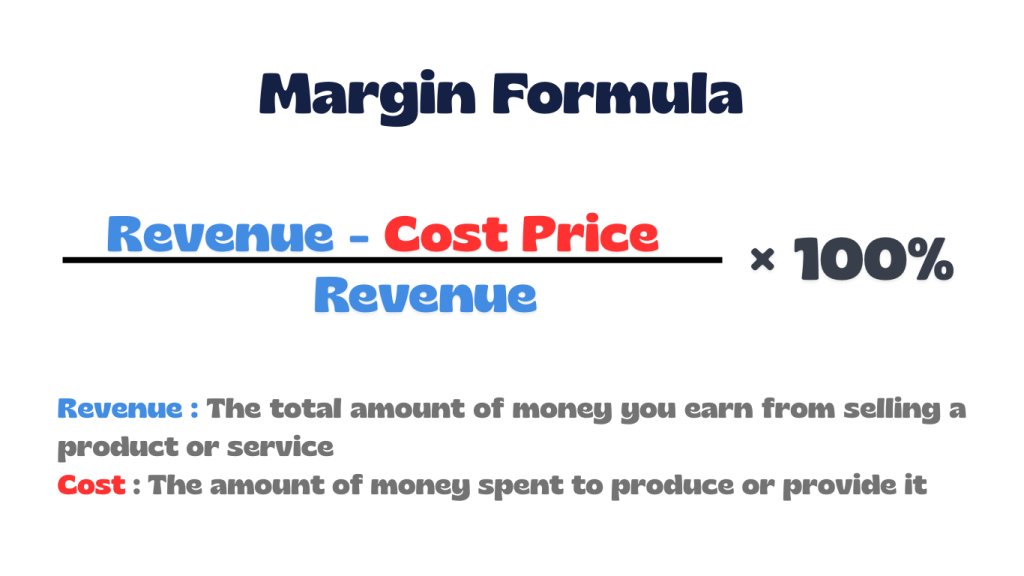
Margin Formula
How to Calculate Margin
These steps are also applied in or profit margin calculator, in the next section you will and real life calculation of margin. Also, the step are the way you have to apply the margin formula.
- Identify Revenue (Selling Price): Determine the total amount earned from sales.
- Calculate Cost of Goods Sold (COGS): Add up all direct costs involved in producing or acquiring the product.
- Find Gross Profit: Subtract COGS from revenue to get the profit amount.
- Calculate Profit Margin: Divide gross profit by revenue and multiply by 100 to get the percentage.
Real-Life Profit Margin Example
You run a small online store selling backpacks. The selling price (revenue) is $50 per backpack and the cost to Produce/Buy (COGS)is $35 per backpack.
Step 1: Calculate Gross Profit => $50 − $35 = $15
Step 2: Calculate Profit Margin => ($15 ÷ $50)×100=30%
Final Result
- Profit per backpack: $15
- Profit Margin: 30%
Difference Between Margin and Markup
Both margin and markup describe profitability but from different angles. Margin is used to determine the overall financial performance and the financial conditions of a company by calculating profit as a percentage of the selling price. On the other hand, markup is commonly used to determine selling prices and calculates profit part of cost. Beside the fact that they both use the same profit amount, markup it is always larger than margin because it is calculated on lower basis (cost). In reality, retailers and companies apply markup to price items and meet profit goals, while investors and analysts concentrate on margin. Beside the margin calculator we also have a markup calculator.
How a Margin Calculator Helps Businesses
By evaluating cost and revenues, the profit margin calculator determines for you the profit, margin and markup which helps companies in setting accurate pricing and boosting their financial health. It simplifies the computation of gross, operating, or net margins, saves time, and lowers mistakes. It helps set the right prices, find the most profitable products or services, make better business decisions, and easily calculate costs or selling prices based on the profit you want, so feel to use our margin calculator based on you business needs.
Real-World Use Cases
Margin calculator is widely used to determine profitability, set prices, and manage financial decisions. Common applications include:
- Retail & E-commerce: Set product prices to cover costs and achieve target profits or check if discounts still allow sustainable margins.
- Financial Trading & Investing: Determine required margin to open leveraged positions, manage risk and calculate potential losses (MTM), or assess available leverage for investments.
- Restaurants & Food Industry: Evaluate profitability of menu items, monitor food costs and control waste and maintain healthy net profit margins.
- Business Management & Strategy: Identify most profitable products/services or evaluate impact of rising costs (inflation) on profits.
Common Margin Calculation Mistakes
When you are calculating margin a lot of mistakes can happen which can lead to a bad impact on your business. Below you will have a list of some of the most common mistakes that can happened during the process of calculating margin. Also, to avoid some of them use our margin calculator.
- Mixing up markup and margin: Using the wrong formula can give the wrong idea of how much money you’re actually making.
- Using Manual Calculations: Calculating by hand or in spreadsheets can cause mistakes.
- Incorrect Formula Application: Simple math errors or wrong steps can give wrong margins.
- Forgetting extra costs: Not counting rent, utilities, or labor can make profits look bigger than they really are.
- Missing hidden fees: Forgetting things like online platform fees, payment processing, or ads can shrink your profits.
- Not updating costs: Using old supplier or shipping costs can make your margins smaller than expected.
Frequently Asked Questions (FAQs)
1. Why does markup always look higher than margin?
Markup is calculated based on your cost, while margin is based on the selling price. Because cost is a smaller number than revenue, markup will always appear higher. For example, to get a 20% margin, you need to apply a 25% markup to your cost.
2. How can a margin calculator help my business?
A margin calculator lets you test different scenarios before making decisions. You can instantly see how changing your costs or prices affects profit, helping you plan pricing, discounts, and cost control more confidently.
3. How do I calculate margin after offering a discount?
When you apply a discount, your margin drops more than most people expect. For example, if a product has a 40% margin and you offer a 20% discount, the new margin becomes 25%, not 20%. This happens because the selling price is reduced while costs stay the same.
4. Can a profit margin be higher than 100%?
No. Margin is calculated as a percentage of the selling price, so it cannot exceed 100%. If you see a value over 100%, you are likely looking at markup instead of margin.
5. How do I convert markup into margin?
You can convert markup to margin by dividing markup by (1 + markup). For example, a 100% markup results in a 50% margin.
6. How do I convert margin into markup?
To convert margin to markup, divide margin by (1 − margin). For example, a 25% margin requires a 33.3% markup on cost.
7. How do rising supplier costs affect my margin?
If your costs increase but your selling price stays the same, your margin will shrink quickly. A margin calculator helps you see exactly how much you need to raise prices to maintain your current profit level.
8. Can I calculate margin if I only know the profit amount?
Yes. If you know profit and cost, the calculator can find your margin automatically. Margin is calculated by dividing profit by total revenue.
9. How do I calculate margin for a service-based business?
For services, costs usually include labor, software, and overhead. The margin is calculated by subtracting these costs from project revenue and dividing the result by revenue. A margin calculator makes this easy without manual math.
10. What is a negative margin and why does it happen?
A negative margin means your costs are higher than your selling price. This often happens during heavy discounts, pricing errors, or unexpected costs like shipping or fees.
Explore More Percentage Tools
Explore more percentage calculators to help with different types of percentage problems from our site, like the margin calculator. Our tools are designed to make it easy to work out with percentage increase, decrease, change, difference, and much more tools that are only related to percentage calculations. Click any calculator below to continue solving percentage questions quickly and accurately.
Markup Calculator
Shows how much you need to add to your cost price to reach a desired selling price or profit percentage.
Percentage Increase Calculator
Measures how much a value has gone up from its original amount, expressed as a percent.
Percentage Change Calculator
Finds how much a value has increased or decreased from its original value in percentage terms.
REFERENCE
The Margin Calculator on this page is based on standard mathematical definitions and explanations from trusted educational resources: