

Our Sales Tax Calculator helps you quickly find the total cost of a purchase after tax or determine how much tax is included in a price. Since sales tax rates vary by state, county, and city, calculating the correct amount manually can sometimes be confusing. This tool makes the process simple by automatically applying the correct percentage, whether you’re shopping, running a business, preparing invoices, or planning your budget.
Note before using: For every 2 combinations of inputs entered you get the third value, or in simple word the input left blank is the result you will get. An example is if you input “Before Tax Price” and “Before Tax Price” you get “After Tax Price”.
What Is Sales Tax?
Sales tax is a type of consumption tax that is applied to the cost of products and some service at the time of purchase. The way reason it is delivered to state or local governments is to finance different public service. Some of these services are public safety, infrastructure, and education after being paid by the customer (buyer) and collected by the sellers. Sales tax to be calculates usually needs a percentage of the final retail price.
Rates of sales tax usually are different depending on the location, and not all goods or services are taxable. Sometimes may be extra local taxes in certain areas, while in some others may not be statewide sales tax. At the time that something is brought and sales tax isn’t applied, such as online purchases or out of state, you may need still to pay a tax later.
Why Sales Tax Is Important
Sales tax are crucial due to the reason that it gives state and municipal governments a consistent source of revenue. Roads, schools, police, fire departments, healthcare, and community facilities are just a few of the vital public services that are funded with the sales tax money. As we said before that sales tax are collected when customers buy products or services, they guarantee that everyone that is involved in the economy contribution to meet the requirements of the public.
Sales taxes give to governments the financial stability they need, since people continue to buy goods even during periods of economic downturn. It is also helpful in guiding economic strategies and to ensure that companies follow tax regulations, by lowering legal risk while supporting long term financial stability.
How Sales Tax Works
Sales tax as you may now is added to the price of products or services at the pint when is sold and is paid by the client. Usually business get these tax during the time of checkout and then later send it to the state or local government. Sales taxes are different and vary by location which may be included state, country, and city taxes that can be combined. In the Unites States there are no federal sales tax, and sales tax is usually charged only to the final client. For business is mandatory to collect sales taxes when they might have a physical or economic presence (referred as a nexus) in a state.
What Is a Sales Tax Calculator?
Our sales tax calculator is a tool that will help you to quickly calculate the tax amount, total price, or pre-tax cost of product which is based on the sales tax rate that you enter. The sales tax calculator need to enter the before tax price and tax rate (based on the rate that you give) and will provide the you the desired results. It is a helpful tool for both the clients and the sellers so they can avoid calculation errors, save time, and ensure that the correct tax amount is charged. You have to keep in mind that for every 2 input fields entered the third one value which is left blank will be displayed. Below you will the formula, steps to calculate, and examples that are also related to the sales tax calculator.
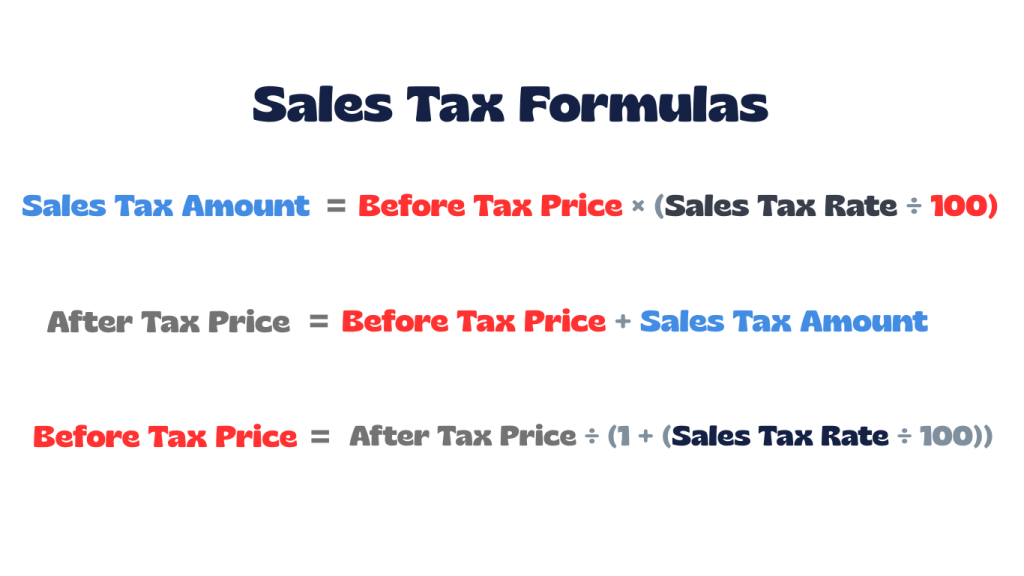
Sales Tax Formula
How to Calculate Sales Tax Step by Step
Applying the appropriate combined tax rate to an item’s price and then adding that tax to the initial cost is how sales tax is computed. Because local sales tax percentages differ based on the location you might be, it’s critical to use the precise state and municipal rate. Below you have the steps to a manual calculation, and these steps are used in our sales tax calculator.
Steps to Calculate Sales Tax:
- Step 1: Identify the item’s price before tax.
- Step 2: Find the correct sales tax rate for the location.
- Step 3: Convert the tax rate from a percentage to a decimal.
- Step 4: Multiply the item price by the tax rate to find the tax amount.
- Step 5: Add the tax amount to the original price to get the total cost.
Real-Life Sales Tax Examples
As we described in the above section on how to calculate sales tax below you will some real life examples so you can have better understanding of calculation process. Also, all the examples that you will see can be calculated with our sales tax calculator. Using our sales tax calculator it helps you to avoid mistakes and quickly find the tax amount, total price, or original price.
Example 1: Calculate Tax Amount and Final Price (Retail Purchase)
You buy a jacket priced at $80 in an area with a 7% sales tax.
Steps:
- Convert tax rate to decimal: 7% ÷ 100 = 0.07
- Calculate tax amount: 80 × 0.07 = 5.60
- Add tax to original price: 80 + 5.60 = 85.60
Result: Tax Amount = $5.60 || After Tax Price = $85.60
Example 2: Find Sales Tax Rate from Before and After Price
A restaurant bill shows $53.50, and the food cost before tax was $50.
Steps:
- Find tax amount: 53.50 − 50 = 3.50
- Divide tax by original price: 3.50 ÷ 50 = 0.07
- Convert to percentage: 0.07 × 100 = 7%
Result: Sales Tax Rate = 7%
Example 3: Calculate Original Price from Final Price and Tax Rate
You paid $1,070 for electronics in a location with an 7% sales tax.
Steps:
- Convert tax rate to decimal: 7% ÷ 100 = 0.07
- Divide final price by (1 + tax rate): 1,070 ÷ 1.07 = 1,000
- Calculate tax amount: 1,070 − 1,000 = 70
Result: Before Tax Price = $1,000 || Tax Amount = $70
Example 4: Vehicle Purchase Sales Tax
You buy a car for $25,000 with a 6.5% sales tax.
Steps:
- Convert tax rate to decimal: 6.5% ÷ 100 = 0.065
- Calculate tax amount: 25,000 × 0.065 = 1,625
- Add tax to vehicle price: 25,000 + 1,625 = 26,625
Result: Tax Amount = $1,625 || After Tax Price = $26,625
Sales Tax vs VAT vs GST
Sales tax, VAT (Value-Added Tax), and GST (Goods and Services Tax) all of them are consumption taxes paid by the final client, but the difference relies on how and when they are collected. Sales tax is collected only when the final retail sale is done, making it a single-stage tax. While the VAT and GST have the same way of working, they are collected in different and multiple stages of the supply chain, with the businesses receiving credits for the taxes they are paying on purchases. These type of methods are helpful for reducing tax evasions and improving transparency. GST is basically a simpler version of VAT that combines many different taxes into one, making it easier for businesses to follow the rules and pay correctly.
Tax-Exclusive vs Tax-Inclusive Prices
The buyer pays the exact amount shown as the tax-inclusive prices already include the tax in the provided price. For tax-exclusive prices is only shown the base price and the tac is applied at the checkout point. Tax-inclusive is a more common pricing in areas that apply F or GST, such the UK or EU, and is helpful for the customers to see the total amount of cost upfront. An simple example is when a pair of jeans cost $50 the same price is the total also. While tax-exclusive is a more common method in the us and especially for B2B transactions, where the tax is calculated separately and added on top of the base price. An example can be when a t-shirt costs $40 you pat the $40 plus the tax at the checkout.
When to Use a Sales Tax Calculator
Our sales tax calculator is helpful to quickle determine the total costs, total bill amount, or tax liabilities by using the right state or local tax rates. Businesses, internet shopping, budgeting, tax filing, and reverse-calculating pre-tax costs all benefits greatly form the tool, so use our sales tax calculator whenever you need it. Below you have a list of hey use cases for the tool:
- Business Transactions: Accurately add sales tax to products or services and ensure compliance with local rules.
- E-commerce & Online Shopping: Estimate total costs when sellers operate in multiple states with different rates.
- Reverse Calculations: Determine the original price before tax when only the total is known.
- Budgeting & Planning: Forecast final prices for large purchases or luxury items.
Common Mistakes to Avoid
When calculating sales tax mistakes can happen from different reasons, and these errors can cause penalties, fines, or audits when they are not managed carefully. Some of the mistakes can happen when the businesses don’t use right taxes rates but use outdated or incorrect rates, misclassify goods or services, ignore nexus regulations in new jurisdictions. Also, other errors include adding tax to shipping or discounts incorrectly, missing local taxes, filing returns late, or accepting invalid certificates. Having poor records and doing computations by hand might also lead to issues. Use our sales tax calculator so you can make more accurate calculation, save time and error free.
Frequently Asked Questions (FAQs)
1. Why do sales tax rates vary by location?
Sales tax rates differ because they are made up of state taxes plus additional county, city, or local taxes. This is why the total rate can change even within the same state.
2. How can I find the correct sales tax rate?
Sales tax rates depend on where the purchase is made and sometimes on the type of product. You can check official state tax websites and use the sales tax calculator to have a correct calcualtion.
3. What does “nexus” mean, and do I have it?
Nexus is a legal connection between a business and a state that requires sales tax collection. This can be physical (like having an office or warehouse) or economic (reaching a sales or transaction threshold). The rules vary by state.
4. Do I need to charge sales tax on every item I sell?
No. While many physical products are taxable, some items such as groceries, clothing, services, or digital goods, may be tax-exempt or taxed differently depending on the state.
5. Do I have to collect sales tax on online sales?
Yes, if you have nexus in the customer’s state. In some cases, marketplaces like Amazon or Etsy collect tax for you, but sellers should always confirm their state obligations.
6. Do businesses need software to calculate sales tax?
If you sell in multiple states, using software is often necessary. There are thousands of tax jurisdictions in the U.S., each with its own rates and rules, which can be difficult to manage manually.
7. Are discounts applied before or after sales tax?
In most cases, sales tax is calculated after discounts are applied, meaning tax is charged on the final discounted price. However, rules can vary by state.
8. Do I need to file a tax return if I had no sales?
Yes. Many states require businesses with an active sales tax permit to file a “zero return,” even if no taxable sales occurred during that period.
9. What happens if I collect too much sales tax?
You are not allowed to keep extra sales tax. Any overcollected amount must either be refunded to the customer or sent to the state tax authority.
Explore More Percentage Tools
Explore more percentage calculators to help with different types of percentage problems from our site. Our tools are designed to make it easy to work out with percentage increase, decrease, change, difference, and much more tools that are only related to percentage calculations. Click any calculator below to continue solving percentage questions quickly and accurately.
Markup Calculator
Shows how much you need to add to your cost price to reach a desired selling price or profit percentage.
Discount Calculator
A simple tool that quickly calculates the final price after applying a percentage discount, helping you determine how much you save and what you pay.
Margin Calculator
Helps you quickly find profit margin, profit, cost, or revenue by comparing selling price against costs.
Commission Percentage Calculator
Quickly calculates earnings based on sales and commission rates, or determines the rate/amount when two values are known.
REFERENCE
The Sales Tax Calculator on this page is based on standard mathematical definitions and explanations from trusted educational resources. The references below provide additional information on sales tax rules and calculations.: