
Our Salary Increase Calculator helps you to quickly determine your new salary, raise amount, or percentage increase. Simply enter any two values, your current salary, raise percentage, or new salary, and the calculator will automatically compute the third. This tool is perfect for performance reviews, job offer comparisons, promotion discussions, and financial planning. It helps you clearly understand how a raise impacts your income and ensures your calculations are accurate and easy to compare.
Note before using: For every 2 combinations of inputs entered you get the third value, or in simple word the input left blank is the result you will get. An example is if you input Current Salary and Raise Percentage you get New Salary.
What Is a Salary Increase?
A salary increase, also known as a pay raise, is an increase in base payment of an employee that is often expressed as a percentage or fixed amount of money. The pay raise can happen from factors including performance, more responsibility, promotions or inflation adjustments. Salary increase are usually permanent, usually based on the present income, and have an impact on future bonuses or benefits. Some of the most typical examples of salary increase are promotional raise, cost-of-living adjustments (COLA), and merit raises.
A 5% increase, for example, raises a $100,000 pay to $105,000 per year. If an employee has a better understanding how salary increase is calculated they can have better organization of their budget and determine their career growth opportunities. Because of this, tools such as our Salary Increase Calculator are helpful for quickly and precisely evaluating possible profits.
Types of Salary Increases
Salary raises are changes made to an employee’s salary to maintain market equality, reward performance, or recognize additional duties. They are crucial for keeping top talent, encouraging employees, and guaranteeing pay equity. Depending on the situation and the cause, these increases might take many different shapes. Below you will have e list of some of the types of pay raise, which our salary increase calculator may help you calculate.
- Merit Increase (Performance-Based): A raise given for exceptional work, achievements, or exceeding goals.
- Cost-of-Living Adjustment (COLA): An increase to match inflation and maintain purchasing power.
- Promotional Increase: A raise awarded when moving to a higher-level position with more responsibilities.
- Market Adjustment (Equity Adjustment): A raise to align salary with industry standards and ensure competitiveness.
- Annual Increase: Regular, often small increases provided on anniversaries or yearly reviews.
Why Salary Increase Matters
The salary increase plays a crucial role in influencing the purchasing power, employee engagement, retention, and career growth. Well structured and efficient increase it is helpful for employees to remain with the company, feel appreciated for their work, and keep up with inflation. Also, when the pay raise happens it provides fairness across assignments, creates a new standard for future rewards, and helps in detecting any pay inequalities. It can be helpful for different companies or business because they can stay competitive in job market and increase the possibility for long-term loyalty, stay and satisfaction, and to make accurate calculation you can use our pay raise calculator.
Factors Affecting Salary Increase Percentage
Factors that may have an impact on the salary increase can be affected by individual performance, business and market conditions. Employees that have greater performance, show initiative, or learn and develop useful skills have higher chances of pay raises. The company’s capacity to offer salary increase is mostly determined by their budget, profitability, strategic goals, and their overall financial health.
As we mentioned before that inflation or cost of living, the demand for certain skills, and market pay standards can all have their impact on the pay raise. Larger change often come as the result of seniority, employment position changes, promotions, and greater responsibilities. The general intention of the salary increase is to reward merit, maintain competition in the labor market, and to adapt with the economic conditions. Usually employees that have their performance on top are more common to receive that are larger than the average.
What Is a Salary Increase Calculator?
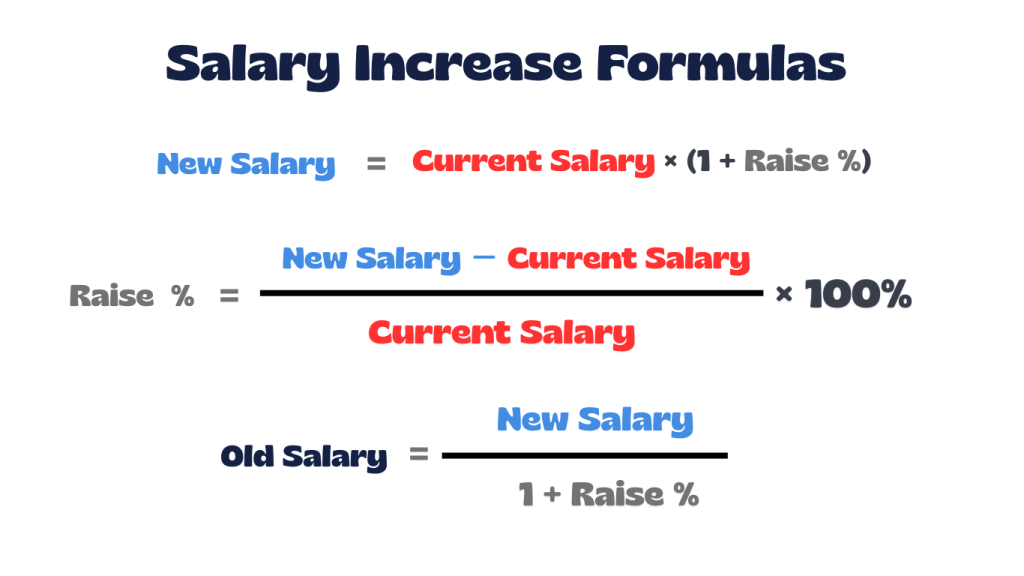
Our Salary increase calculator is a tool that will help you to quickly calculate your new salary based on the raise percentage and the old salary. The salary increase calculator only need to enter you current salary and the percentage increase, then it will quickly show you the new total pay value. These calculator can be useful when you may evaluate promotion, cost of living raises, merit raise, and new job offers. Salary increase calculator may help with financial planning, when negotiating new salary, and helping employers to have fair and consistent pay changes. Below you will have the formula, examples, and step by step calculation of pay raise, which also are what our pay raise calculator does.
Salary Increase Formula
How to Calculate Salary Increase Step by Step
Calculating a salary increase is a simple process that helps you understand how much your pay has grown and what that increase means in percentage terms. By comparing your old salary with your new salary, you can clearly see the value of the raise and evaluate whether it meets your expectations or market standards. The steps that will be shown below are how to calculate it manually, also the steps that salary increase calculator follows.
Step-by-Step Process:
- Step 1: Identify your current (old) salary.
- Step 2: Identify your new salary.
- Step 3: Subtract the old salary from the new salary to find the increase amount.
- Step 4: Divide the increase by the old salary and multiply by 100 to get the percentage increase.
Real-Life Examples of Salary Increase Calculations
Below are some real life examples on how to calculate salary increase and having a better understanding is very important. Salary increases can be calculated in different ways depending on what information you already have. Our Salary Increase Calculator makes this easy by letting you enter any two values and instantly showing the result. This helps you clearly see how a raise changes your pay and avoids doing the math by hand. All the examples that you will see can be calculated in our pay raise calculator.
Example 1: Calculate New Salary from Percentage Increase
An employee earns $50,000 annually and receives a 5% raise.
Steps:
- Convert percentage to decimal: 5% ÷ 100 = 0.05
- Calculate raise amount: 50,000 × 0.05 = 2,500
- Add raise to current salary: 50,000 + 2,500 = 52,500
Result: New Salary = $52,500 || Amount Raised = $2,500
Example 2: Calculate Percentage Increase from Old and New Salary
An employee’s salary increased from $40,000 to $44,000.
Steps:
- Find the difference: 44,000 − 40,000 = 4,000
- Divide by old salary: 4,000 ÷ 40,000 = 0.10
- Convert to percentage: 0.10 × 100 = 10%
Result: Percentage Increase = 10% || Amount Raised = $4,000
Example 3: Calculate Old Salary from New Salary and Percentage Increase
An employee now earns $63,000 after receiving a 5% raise.
Steps:
- Convert percentage to decimal: 5% ÷ 100 = 0.05
- Divide new salary by (1 + decimal): 63,000 ÷ 1.05 = 60,000
- Find raise amount: 63,000 − 60,000 = 3,000
Result: Old Salary = $60,000 || Amount Raised = $3,000
Example 4: Hourly Wage Increase
An employee earns $20 per hour and receives a 10% raise.
Steps:
- Convert percentage to decimal: 10% ÷ 100 = 0.10
- Calculate raise amount: 20 × 0.10 = 2
- Add to base wage: 20 + 2 = 22
Result: New Hourly Wage = $22 || Increase Amount = $2 per hour
Common Mistakes in Salary Increase Calculations
When calculating salary increase some mistakes can happen due to manual calculation and not taking some things into consideration. When may use our salary increase calculator some mistakes can happen because the results may be misinterpreted rather than the calculation itself. Many people apply inaccurate or out-of-date salary data, fail to account for taxes, deductions, or retirement contributions, and mistakenly believe that gross pay is equal to take-home income.
Some other common errors can be to just focusing on base pay and ignoring other forms of payment, including commissions, bonuses, benefits, on non-cash perks. When evaluating or determining a raise, people also ignore the state of the market, inflation, and the company’s finances. In order to make well-informed decisions, a pay raise calculator should be used in combination with market research and financial context as a planning and comparison tool, not as a promise.
When to Use a Salary Increase Calculator
When you needs to understand how your raise has affected you pay the salary increase calculator can be useful anytime. It is helpful when you are reviewing performances, promotions, and when negotiating job offers by displaying the precise effect on the income from the percentage rise. Also, you can look into how the increase may affect savings, budgeting, and financial planning by using these tool.
A pay raise calculator make sure that compensation decisions are fair, to compare various raise situations, and to confirm if the raise is still keeping track with inflation. For both companies and workers, it improves data-driven discussions by delivering fast and precise findings.
Frequently Asked Questions (FAQs)
1. Can I use the salary increase calculator for hourly wages?
Yes. Just enter your hourly rate instead of an annual salary. For example, $20 per hour with a 5% raise becomes $21 per hour.
2. How long should I wait before asking for a raise?
It’s usually best to wait 6 to 12 months after starting a new role or after your last raise. This gives you time to demonstrate your value and achievements.
3. What is a typical annual raise?
Most standard annual raises, whether for cost-of-living adjustments or merit, range between 3% and 5%.
4. Should I bring up personal financial needs during negotiations?
No. Focus on your performance, market value, and contributions rather than personal expenses like mortgages or bills.
5. How do I calculate a raise when switching jobs?
The formula stays the same, but job switchers often aim for a 20–40% increase over their current salary to account for the change, rather than the usual 3–5% annual increase.
6. How do higher tax brackets affect my raise?
A big raise might push you into a higher tax bracket, meaning your net (take-home) pay could increase less than your gross salary.
7.When is the best time to use a salary increase calculator to ask for a raise?
Ideal times include:
- Right after a positive performance review.
- After completing a major project or milestone.
- At least 6–12 months since your last raise.
8. How can I find the percentage of a raise I’ve already received?
If you know your old and new salaries, the raise percentage is:
((New Salary − Old Salary) ÷ Old Salary) × 100
9. Is a 10% annual raise the same as a 10% monthly raise?
For a one-time adjustment, yes. But over time, compounding differs depending on how often the raise is applied.
10. What’s the difference between a raise and a bonus?
A raise increases your base salary permanently, while a bonus is a one-time payment and doesn’t affect future pay.
Explore More Percentage Tools
Explore more percentage calculators to help with different types of percentage problems from our site, like our pay raise calculator. Our tools are designed to make it easy to work out with percentage increase, decrease, change, difference, and much more tools that are only related to percentage calculations. Click any calculator below to continue solving percentage questions quickly and accurately.
Commission Percentage Calculator
Quickly calculates earnings based on sales and commission rates, or determines the rate/amount when two values are known.
Attendance Percentage Calculator
Instantly finds attendance percentages or required days to meet a target, helping track presence and compliance.
Percentage Change Calculator
Finds how much a value has increased or decreased from its original value in percentage terms.
REFERENCE
The salary Increase calculator on this page is based on standard mathematical definitions and explanations from trusted educational resources: